

My First Hands-On Run with Lovable
I Built a Working Prototype with Lovable — Here’s What I Learned

I first stumbled upon Lovable in February when the designer on the product I was conducting research for used it to build a highly functional, interaction-heavy prototype. This prototype was fluid, agile, and robust—much more than what I thought was possible with Figma-based prototypes. Lovable is an AI-powered full-stack code generator. You describe what you want to build in plain English—a website, app, or tool—and it:
Generates a working prototype instantly
Lets you tweak it via natural language prompts
Offers live previews, code syncing with GitHub, and one-click deployment
So when I found myself in a hackathon team without an engineer on board, I decided to see if AI could pick up the slack. Turns out, coding with AI is wild and weird. It is as quick as you can say Jack Robinson and as easy as ABC, which makes the experience gratifying—but without the weirdly satisfying exhaustion that comes from hours of debugging a piece of code.
What I Used It For
My hackathon project, Kickstart Your Search, introduces a quick, interactive data capture experience that allows travelers, shopping for lodging on their Expedia mobile app, to select property images, styles, and preferences upfront. This captures implicit intent early in the journey, enabling us to deliver more tailored, relevant search results from the start.
This business-specific hackathon was on a tighter schedule with fewer resources than the organization-wide hackathons I have been a part of. My only teammate was a designer who I had been collaborating with on work projects for over a year. Once we were sure we didn’t have the time or resources to bring an engineer on board, we decided to deploy AI as the third multi-faceted, high-performing member on our team.
Lovable was the obvious choice for the job because:
Both of us have had toyed around with it in the past
It was free
It offered code synching and deployment with Github
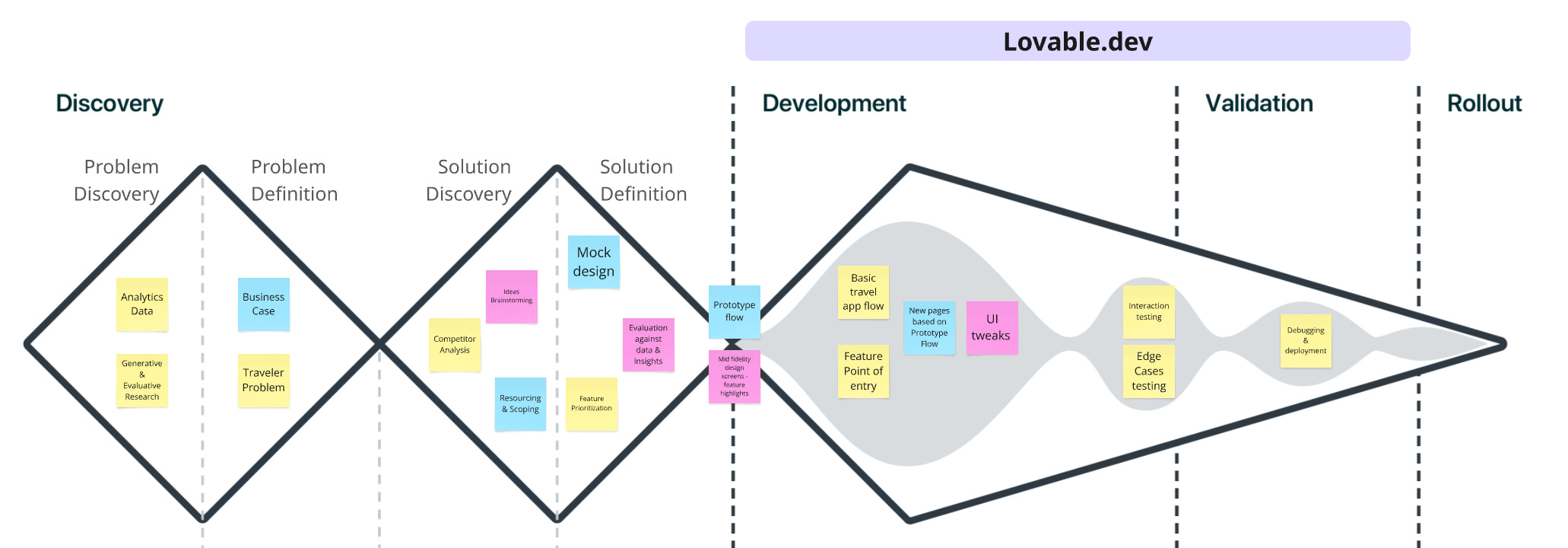
What Worked Well
There are a lot of things to love and appreciate about Lovable and it’s capabilities. So far, my exploration has been limited to creating an interactive frontend experience that tells the visual story of what the product or feature is supposed to do and how it serves the user in their product journey. I have not yet worked on creating a full-blown backend architecture. Everything I share in the next few paragraphs is a reflection of my limited experience with the tool.
Speed
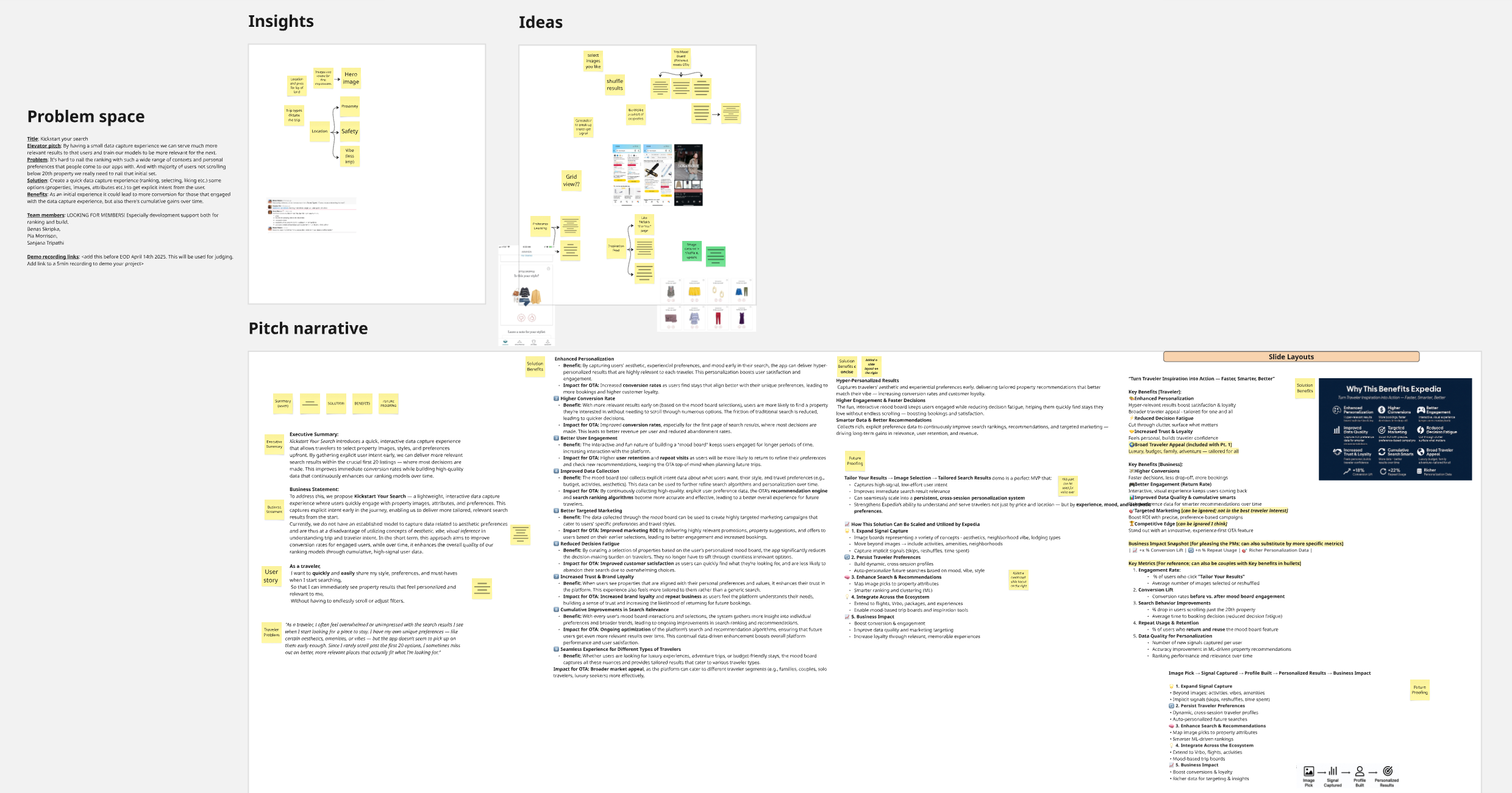
I was able to spin up a neat proof-of-concept in an hour or so, factoring in the time it took me to register, verify my email, get visually comfortable with the console and work myself up to start typing in the first input. Something I would like to call out here is, all the preparation done in advance (more about it in the next section) that came in real handy and helped me make the most of how quick this tool can be at bringing your visions to life.
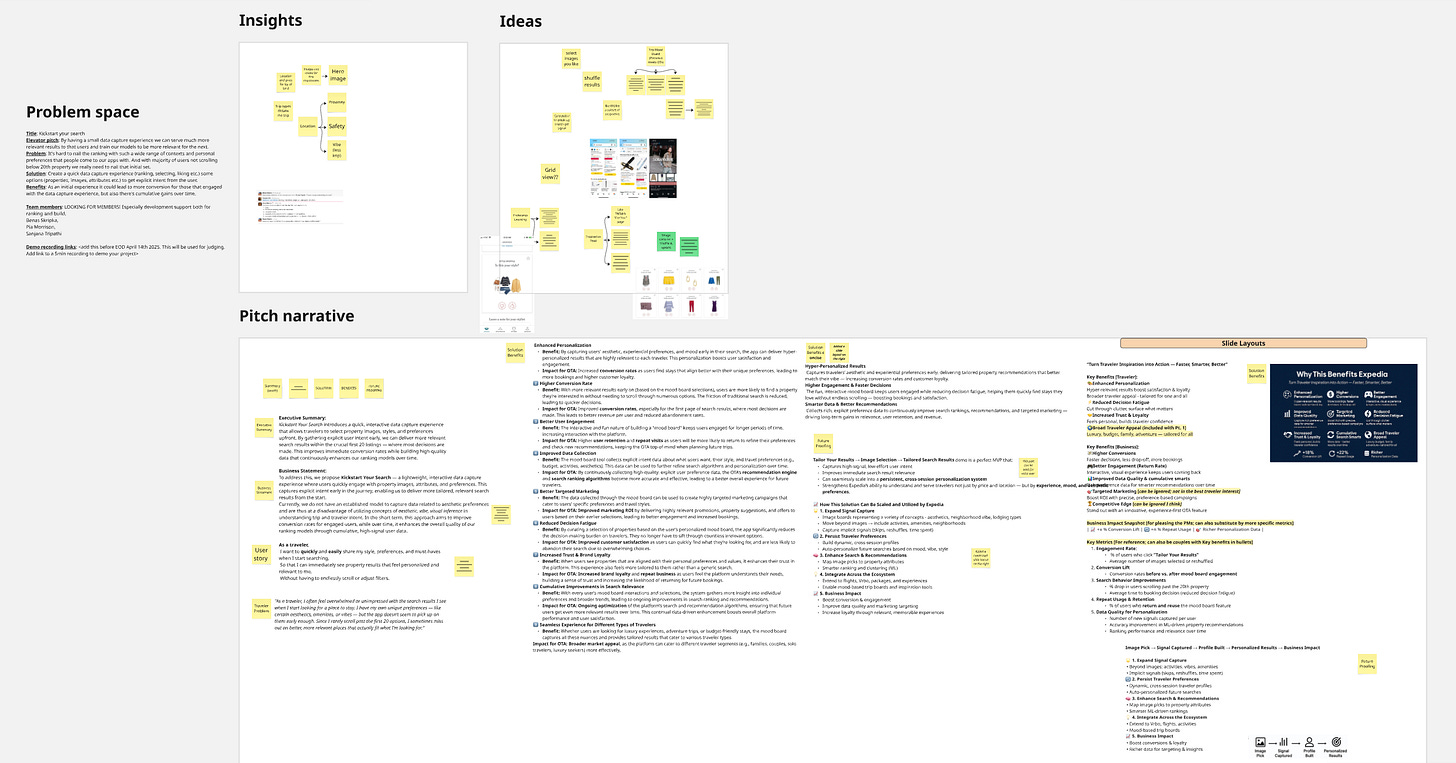
A snapshot of the prep done before moving into prototyping Ease of use & Flexibility
Getting the whole thing off the ground was as easy at it gets. I appreciate that the onboarding experience asks the user to rate their coding skills on a 4-point scale (don’t quote me on the scale), however I am not sure how exactly the tool utilizes this information in code rendering or bug fixing.
Use of Natural Language and Images as input
In addition to the obvious usage of natural language as an input to initiate code generation, the tool allows users to upload images for usage in the product and for referencing. This feature enhances the user’s ability to set context more clearly and easily with the help of visual references designed or found on the internet.
AI bug fixing & instant undo
Lovable uses AI-assisted debugging to help users identify and fix errors in the code. Gone are the days where you spent hours looking at a bleak, black screen parsing through hundred of lines of code trying to find the missing closing brace. On Lovable, errors (like console errors, broken components, syntax issues) are automatically detected and auto-fixed in real time or through suggestions that can be implemented using natural-language prompts.
E.g. Prompt: “Fix the hotel card images not loading”
and it will locate the issue in the code, adjust the logic or asset paths, and test the fix.Furthermore, Lovable maintains a versioned history of your project as you go about creating and making changes, including rewriting prompts. If a change goes wrong or does not work or look the way as expected, the user can:
Instantly undo a step
Roll back to a working version from history
Compare before/after versions
Clean, well-designed User Interface (UI)
I was honestly surprised at the generated UI for a page that I didn’t specify visual referencing or detailed prompting for. The UI generated was in alignment with modern UI/UX design principles without any user-prompts related to the UI or the experience. The proof-of-concept looked professional and polished right out of the box which saves time and energy otherwise spent on fighting bad design and experience. Users can create and test different interaction patterns (cards, lists, buttons) without worrying if they're following best practices. With detailed prompting and visual referencing the UI can potentially look closer like a part of the brand’s design ecosystem. And handoffs to the developers is faster with a clean, modular code.
E.g. for the Search Results Page for my travel app, Lovable automatically:
Aligned cards in a responsive grid
Maintained consistent spacing and padding between cards
Styled buttons with proper hover states, colors, and font sizes
Ensured text inside cards had logical hierarchy (hotel name > location > rating > price)
Handled mobile and desktop breakpoints gracefully
Collaborative branching & live editing
Lovable offers built-in version control for your prototypes and proof-of-concepts. Just like in Github, users can create different branches (versions) of a project to explore different ideas, interactions, flows etc. Users can switch between these branches, compare them, or merge them if needed.
E.g. Let’s say you’re testing:
Branch A: Hotel cards with expandable details
Branch B: Hotel cards opening in modals
Branch C: Hotel cards with inline details and sticky filters
You can create and test these side by side without breaking your base prototype.
Lovable also allows multiple people to edit the same prototype or feature at the same time and the changes appear immediately for everyone. Think Google Docs but for code.
Own your code - Export or Sync to GitHub
The generated production-grade code is available for export as real files at all times without any fees or proprietary locking. To take it a notch further, integration and deployment on Github is facilitated through a simple one click process that asks users login to their Github account and automatically links and syncs the code to a Github repository. This allows users to take the product on the road, for no cost, by simply using Github Pages.
Things to Be Mindful Of
Like everything in life, this tool is not without it’s quirks.
Prompt clarity matters more than you think
It won’t be entirely false to claim that your success with the tool largely depends on your ability to frame prompts that are clear, comprehensive and communicate context with nuances from the get-go; contextual nuances that often become apparent through ongoing dialogue between humans or through system print commands and console logs between humans and code. Lovable could enhance the experience of code generation for non-developers and developers alike by smarter handling of ambiguous prompts through flagging, cross questioning, feedback etc. The tool allows the user to include these nuances later on but on a free plan, you are limited by the number of prompts you can input in a day.
What made the process of proof-of-concept creation for me exceptionally fast was the intense preparation I and my teammate had done leading up to it. From having the traveler problem and business use case ready to having our goals and priorities of the feature clearly defined, enabled me to write prompts that were comprehensive, unambiguous, contextually sound, and aligned to a design and product experience vision. Having some (Figma) design screens handy cushioned my prompts with visual references wherever needed.
Debugging AI-generated code still needs a human eye
In my most recent interaction with the tool, I often found myself debugging the code manually instead of relying on prompt-based AI fixes. This stemmed from the limitation of the tool in communicating the bug or the error clearly and precisely and consequently its inability in fixing it automatically. The modular code organization and standardised file naming conventions immensely helped in speeding up the debugging.
Still maturing - May lack niche integrations
The tool is still maturing and thus lacks some miche integrations. Within the frontend framework, Lovable could add
More customizable UI kits or themes: Right now, it leans toward clean defaults but integration within specific branded design systems could make prototyping easier for non-designers.
More microinteraction controls: While layouts are polished, animation and feedback cues could use more configurability for UX-specific tests.
Generated code might need optimization
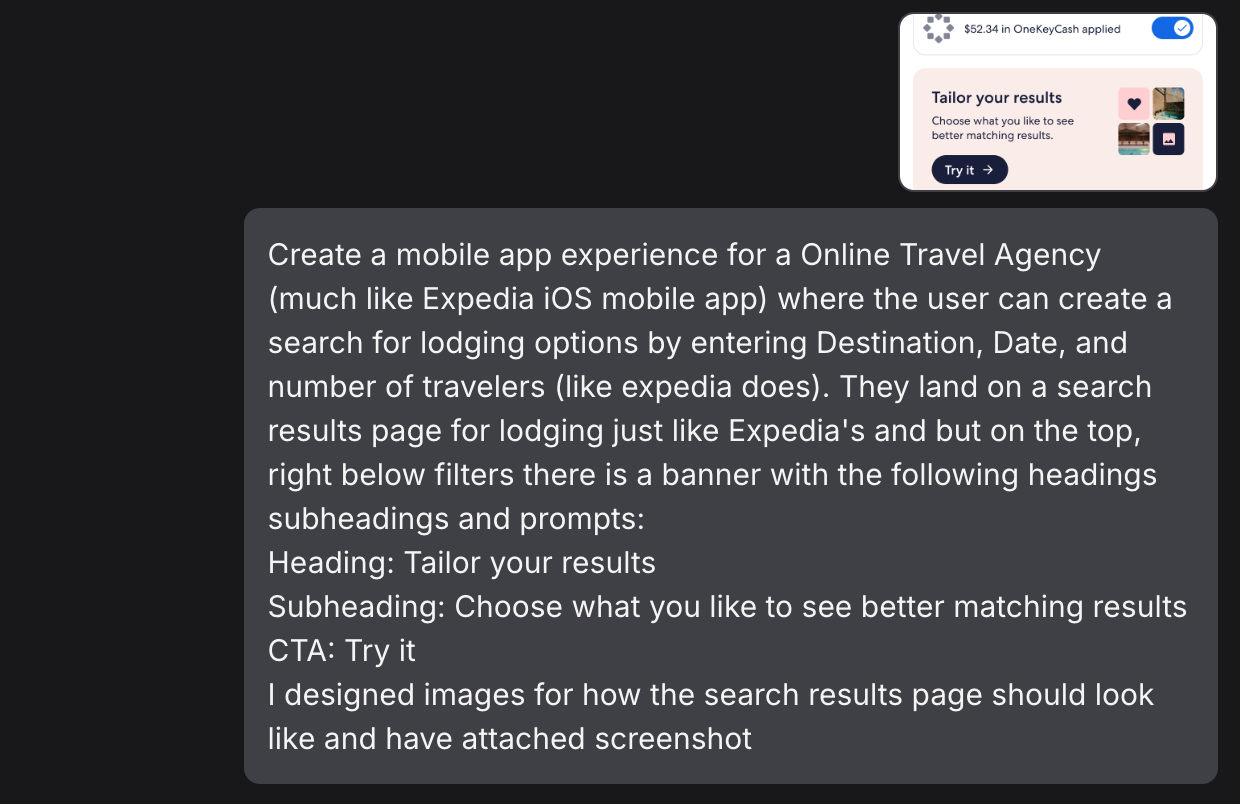
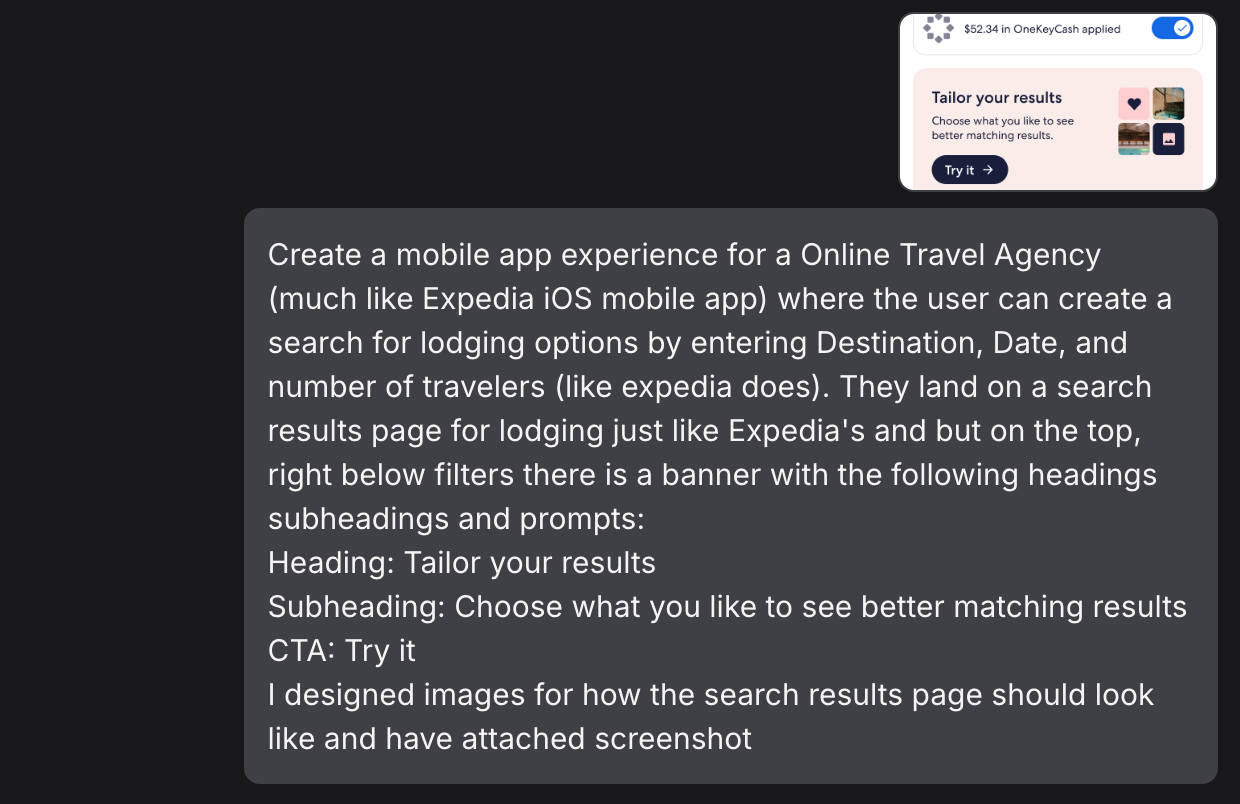
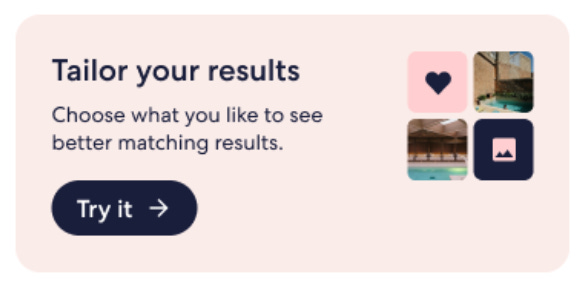
Even with contextual and comprehensive prompts, the code is not foolproof and often needs tweaking and optimization. I will explain this through an example. On the Search Results Page of my travel app I wanted to create a banner that had the following components: a heading, a subheading, a Call-To-Action, and an icon.
Prompt: When the user lands on a search results page for lodging add a banner on the top of the results list, right below filters, with the following headings subheadings and prompts: Heading: Tailor your results Subheading: Choose what you like to see better matching results CTA: Try it I designed images for how the banner should look like and have attached images.
Prompt Critique: forgot to mention that on the right side of the banner is a small image or icon that will be provided by the user.
Result: The generated code did not account for the image component within the banner and no amount of follow-up clarification through prompts could fix the issue.
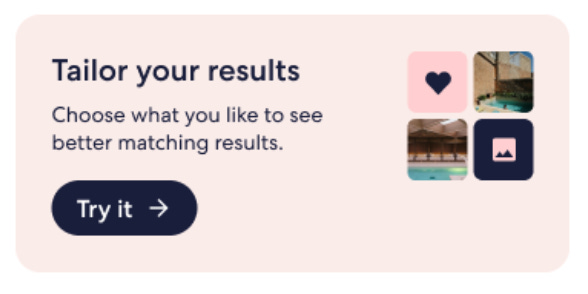
Image attachment for prompt reference Better collaboration controls
Collaboration on Lovable too could use a bit of polishing. Bigger, mixed-skill teams would benefit from simple things — like commenting or annotation tools right inside live branches for async feedback. I also found myself wishing Lovable would borrow a leaf from GitHub’s playbook and give us branch merge previews, so you can actually see what’s changing before committing to it. And while we’re at it, role-based controls — view-only, edit, review — would go a long way in keeping workflows cleaner, smoother, and a little less chaotic. The real game-changer for me though would be if session recordings could link directly to prototype branches. Imagine being able to easily trace back which participant saw which version, without digging through notes and filename
Potential over-reliance on AI for non-technical users
Like with any shiny new AI tool, there’s a bit of a risk of over-reliance — especially for non-technical users. It’s tempting to trust the AI to get everything right, but the truth is, AI-generated code still needs a discerning eye. I’ve noticed that it’s easy to overlook what’s happening under the hood, especially when the interface makes everything look so neat and finished. For folks who aren’t used to reading code, this can lead to a false sense of confidence in prototypes that might not actually work as intended, or scale well later. The tool does a great job of lowering the entry barrier, but I’d say it’s equally important to stay curious about the code it’s writing for you.
How Lovable helps UX Researchers
As Lovable matures and offers more widespread integrations, interaction controls, and customizable UI kits, it can emerge as a powerful new tool in the UX Research tool kit.
User Testing Ready
The best part? You don’t need to wait for dev resources to test if something even makes sense. I had a working prototype in a few hours, ready to throw into user tests.
Rapid Iteration during Testing
Tweaking mid-session? Yes, please. Loveable lets you make small (or big) changes between sessions so you can learn faster — without praying a developer has time next week.
Simulate Realistic Scenarios
You're not handing users static screens and asking them to imagine. These flows behave, break, and succeed like a real product — and that changes how people react.Experiment with Variations
Want to test copy, layout, or button logic? You can spin up realistic variations without calling in favors from engineering.Collaborating with Stakeholders
Instead of explaining “what this could look like,” I could show it. In a meeting. On the spot. People got it immediately — and actually gave helpful feedback.More Realistic Stakeholder Reviews
Stakeholders finally react to something that behaves like a real product. Their feedback is less “vibes-based” and more grounded in how it actually works. Which… is the dream.Version Control for Experiments
Every branch becomes a little research time capsule. You know exactly what participants saw, and you can always trace feedback back to a specific version.More Risk-taking
When you’re not stuck behind dev bottlenecks, it’s easier to try bolder, weirder, more interesting ideas — which often lead to better insights anyway.
What I’m Excited to Explore Next
I am currently in the process of testing another travel-related data concept using Lovable. The idea has lived in my head rent-free for months now and it’s high time that its evicted. Hiding under the garb of environment set up, data access and permissions, procrastination has created an intricate web of imaginary red-tape that needs to be snipped before it turns into a full-blown, self-inflicted bureaucracy. Eternally grateful for the Lovable sheers - I am excited to finally snip through and explore visualization of travel related data from the lens of traveler context and consumption preference.
I have already spent days and hours playing around with Lovable and yet it feels like just the start. I’m curious and intensely stoked about exploring the backend and data related features and integrations Lovable has to offer.
Have you tried a tool like Lovable to create something at work or for fun? I’d love to hear what you built and how you built it. Getting my hands dirty with the tool has sparked in me a drive to dive deep into the far end to explore all sorts of possibilities and pitfalls - manifest all my brain-children into living specimens, sooner rather than later. So, if you’re curious about an LLM model or an AI tool like this, or gestating an idea you would like to see come alive, hit me up. Always down to geek out together.
If you wish to learn more about framing and writing prompts for LLM based platform, like Lovable and ChatGPT, let me know in comments or messages.